Ensuring fast, full backups for every Web Hosting customer
A very small number of hosting accounts contain very large numbers of files, which can be a problem for everyone.


From Wednesday 8 April, we are going to place a limit on the number of files that you can store in any new Web Hosting, WordPress Hosting, or Email Hosting account. Older accounts, opened before 8 April, will be unaffected. The cap for new accounts will be very high, at 250,000 files, and for most people it will make literally no difference to the way you use your hosting.
But it will bring a benefit for a lot of MyHost customers, by unclogging the systems that take and restore backups.
How big is a 250,000 file limit?
In a word, big. Today our hosting customers have an average of around 11,000 files in each account. A freshly-installed instance of WordPress contains fewer than 2,000.
If we applied this cap to the tens of thousands of existing hosting accounts on our servers (which, to be clear, we are not doing), the number of affected accounts would only be in the double figures. In a lot of cases, file numbers get big enough to hit our new limit when there’s a technical issue, perhaps a misconfigured plugin, that ought to be fixed. Issues like these can usually be solved without affecting websites.
You can check your own number by logging into cPanel (here’s how) and looking under “Statistics” on the right hand side. You’ll see File usage in that list.
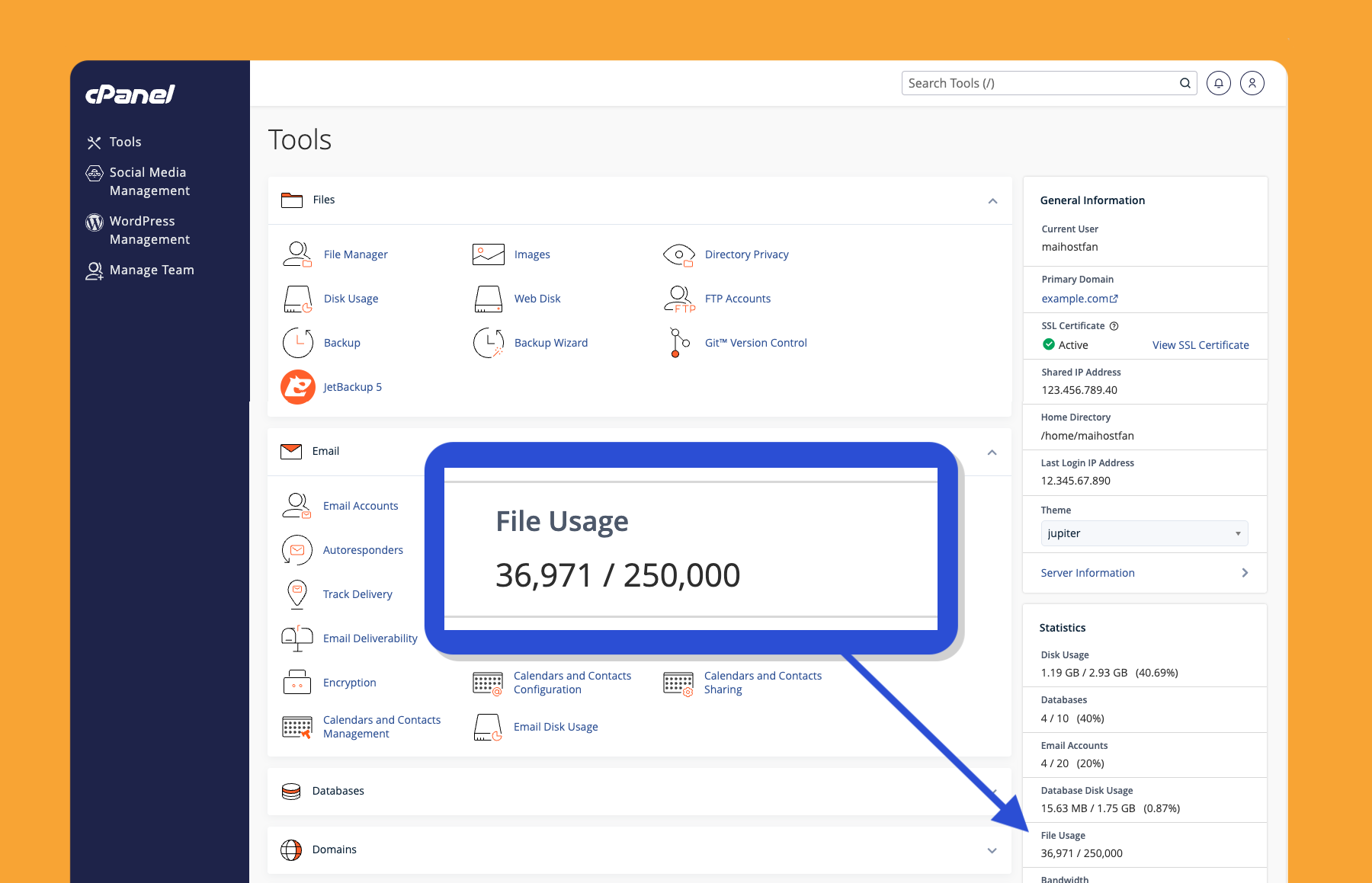
So why impose a limit at all?
To be very clear, this is not about the overall amount of storage that anyone is using. There’s not actually much of a relationship between the number of files in a given account and the number of gigabytes that those files take up (especially if a looping piece of software is to blame). When it comes to gigabytes of disk space, we are not changing our promise of unlimited storage—but, as always, our fair use and acceptable use policies will continue to apply.
The reason we’re looking at the overall number of files is because of the way backups work. We back up every hosting account every day, and we store 14 days of backups. That way if you happen to lose a website or mailbox, there’s a recent copy ready to restore.
As you can imagine, taking a copy of everything stored by our hosting customers is a very big job. Without getting too deep into the way that our system works, there are two important facts to know:
- With multiple customers hosted on each server, an issue with the automated back up of one account can have knock-on effects for many others.
- The time it takes to back up a server depends much more on the total number of files than on the total storage space used.
When one account’s file numbers run into the hundreds of thousands, or even the millions, that can cause issues for automated backups. The system essentially clogs up. The best case scenario is that our busy experts have to spend time solving the problem. The worst case would be failed backups. Not exactly ideal for something that’s a crucial part of everyone’s disaster recovery plans.
Restoring backups can become an issue as well. When there are too many files to restore, the entire process can fail. When you are already in a situation where you need to bring a backup back to life, the last thing you need is another technical issue that keeps your website offline (or your emails inaccessible). Even worse, there can be situations where one account’s excessive file numbers cause restoration problems across an entire server.
If you get close to the limit
It’s unlikely, but if you are one of the few customers to get close to storing 250,000 files, cPanel will automatically detect that you’re close to what it calls your “inode limit”. You’ll receive an email alert at 200,000, which gives you the chance to clear space via cPanel.
Today our hosting customers have an average of around 11,000 files in each account.
If files keep building up to 250,000, new files will not be able to be saved. This could affect the way your websites operate, and lead to emails bouncing with a “mailbox full” error.
How Reseller Hosting is affected
Our professional Reseller Hosting packages include a separate cPanel account for each of your customers. That means that every customer has their own quota of 250,000 files.
Reseller Developer packages, which we launched in February, are a little different. Because these use add-on domains to keep costs down, there can be up to 15 websites but there’s only ever one cPanel account. This means that the file limit applies across the entire package.
New hosting packages, from 8 April 2026
The new cap of 250,000 files per hosting package will take effect for any hosting packages opened from Wednesday 8 April. Existing hosting packages are unaffected.
If you have any questions about how this change is likely to affect you, start by checking your own file numbers in cPanel’s Statistics breakdown. And as always, if there’s anything we can help with please just ask.
Main image by Eli Digital Creative from Pixabay
Real words from real MyHost customers
Great service and really quick response within 30 mins of logging the job at night. Solutions were correct and quick with suggestions to improve the site as well. This was totally unexpected for a small customer who have a small club site, where the expectation was to be at the bottom of the pile. Well done and thanks to the support team. ★★★★★

Finally!! mikeleggbooks.com/shop is up and running again and the emails work again. Check it out, it works! We are so grateful to MyHost who made the transition so easy after the chaos we have experienced from our last internet website provider. So a shout out to this company if you are looking for a website and want efficient, professional and outstanding service.

Hosting and Domains
Find what you need
Web Hosting
From $7.95/mo
Domains
From $12.00/yr
Reseller Hosting
From $25.95/mo
Email Hosting
From $3.95/mo
Ask us anything
Wondering how hosting works? Got a tricky storage situation? Not sure of your best option?
Contact us