Warning: Phishing emails impersonating MyHost
Email phishing scams are targeting MyHost domain name customers. The most recent attack included a link to a fake, but very convincing, “login” screen.

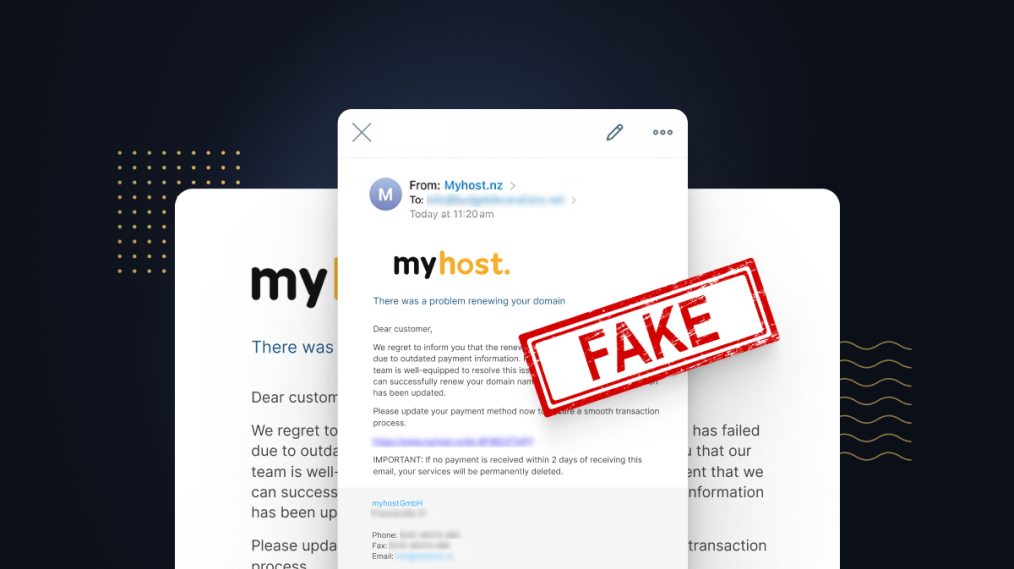
In the last few days lots of MyHost customers have reported fraudulent emails impersonating MyHost.
The email, containing the subject line “Renewal of your domain name failed !”, contains a link to a fake, but convincing, recreation of the MyHost login screen.
The link included in the email's body shows an address that appears to be from myhost.nz but when clicked actually directs you to the scam website.
At first glance the email appears to be sent from myhost.nz but the sender address, <[email protected]>, has no connection with MyHost.
While the email suggests that “There was a problem renewing your domain” due to outdated payment information, we can confirm this email is a phishing attack and not genuine.
What can I do?
If you have received this email, DO NOT click any links, report it as spam, and delete the email.
Unfortunately, if you have clicked the link and attempted to log in your account details have very likely been compromised.
We recommend you change your password immediately, enable two-factor authentication, and check your account for suspicious changes. If you’re unable to log in, or there are unexpected changes to your account, please get in contact with us.
In New Zealand, contact details for domain holders are visible via WHOIS lookups. Unless you’ve applied Privacy Protection to your domain, scammers can use this to obtain your contact email for phishing attempts like this one.
To prevent this, at MyHost we offer Privacy Protection for .nz domains and international domains like .com for a small fee. Domain privacy is not available for .au domains.
A growing problem, stay in the loop
Unfortunately, phishing attacks like this are occurring with increasing frequency in the hosting space. It’s impossible to predict exactly what form and shape the next phishing attempt will take, or when it will take place.
To keep track of the increasing number of scams targeting our customers, we now maintain an up-to-date Phishing Alerts page.
If you’re unsure whether an email you have received is genuine or not, check the Phishing Alerts page as a first step. If you are still not sure, forward it to [email protected] and we will confirm whether it is genuine or not.